April 7, 2026
Protato: A Simpler Way to Create High-Fidelity 3D Mockups for Your App
Most app developers and designers face the same problem when it comes to product visuals: the tools that produce great results are too complex, and the tools that are easy to use produce results that look cheap. Protato was built to solve that problem by sitting squarely in the middle — a 3D mockup tool that produces studio-quality visuals without the learning curve of professional 3D software.
This post covers what Protato does, who it's built for, and why it takes a different approach to creating product visuals than most tools on the market.
Why Most 3D Mockup Tools Fall Short
Product visuals are unavoidable when you ship an app. You need them for your landing page, App Store screenshots, social posts, and product demos. Despite how central they are to the shipping process, creating them rarely feels like part of it.
The typical workflow looks something like this: export a screenshot, open a separate design tool, manually adjust perspective, fake some lighting, tweak the composition, and export again — often only to find you need to go back and start over when the design changes. For professional results, many teams turn to tools like Blender or Cinema 4D, which are powerful but require significant time investment to learn and operate.
Protato's premise is that most developers and designers don't need a full 3D pipeline. They need something narrower — a purpose-built tool that handles the specific task of placing app content into a realistic 3D scene and exporting it cleanly.
How Protato Works
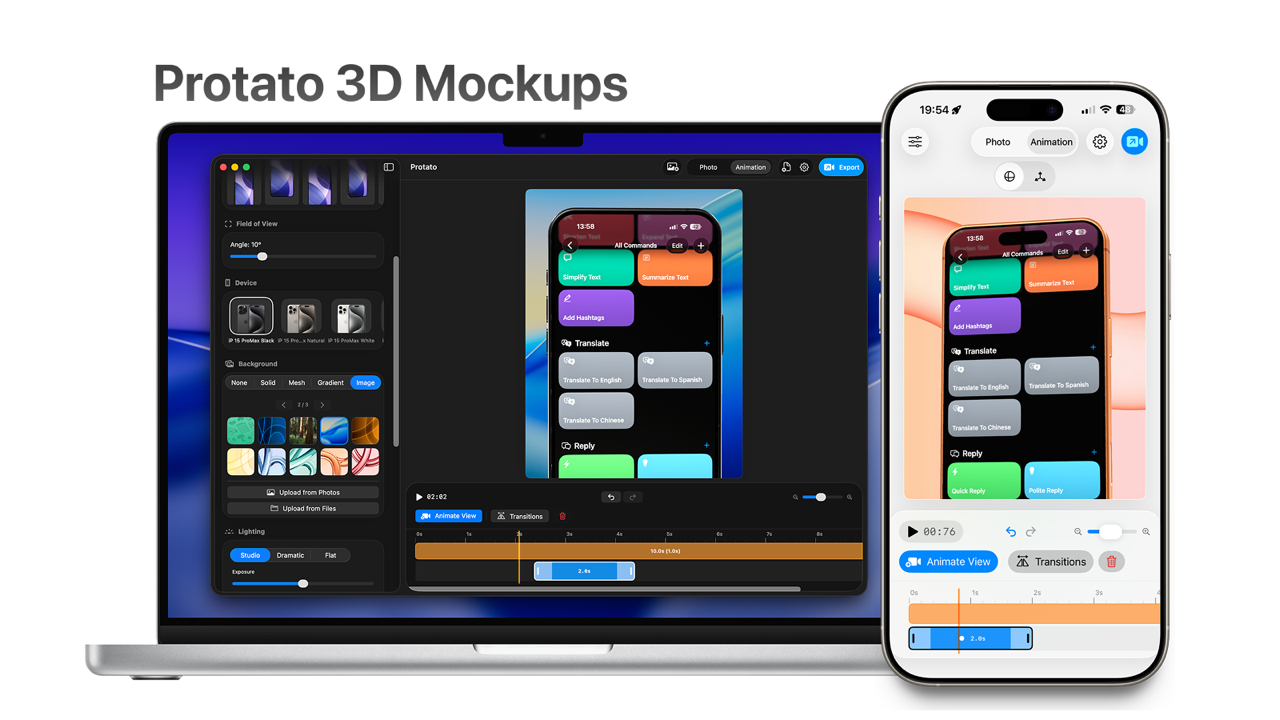
Protato is a live, visual editor. You import your screenshots or screen recordings, place them into a 3D device model, and adjust the scene around them in real time. There's no rendering queue to wait on and no hidden pipeline to navigate. What you see in the editor is what you export.
The device models are high-fidelity, meaning reflections, materials, and perspective all update automatically as you adjust the scene. If you drag the camera to a new angle, the lighting and reflections move with it. The goal is to keep your focus on the final result rather than on the mechanics of producing it.
What You Can Control
Protato gives you meaningful control over the things that actually shape the look of a mockup, without overwhelming you with options that most people never touch.
Materials let you choose how the device surface looks — matte, glossy, or metallic — which can dramatically change the mood of a visual. A matte finish reads as clean and editorial; a glossy finish feels more commercial and polished.
Lighting controls the direction and character of the light source. Soft lighting produces even, approachable visuals. Dramatic, directional lighting creates contrast and depth that works well for hero images and social content.
Backgrounds can be a solid color, a gradient, a custom image, or fully transparent. Transparent backgrounds are especially useful if you're placing mockups into a layout where you control the background separately, such as a landing page or presentation deck.
Adding Motion to Your Mockups
For teams creating short product clips or demo videos, Protato includes a lightweight animation timeline. You can move the camera, adjust materials over time, and sync animation with a screen recording — all without working in a dedicated motion graphics application.
This isn't a replacement for After Effects or Motion. It's intentionally limited to the kinds of animations that make sense for product marketing: a smooth camera rotation, a subtle material transition, a device that tilts into frame. Those capabilities cover the majority of what product teams actually need from animated mockups, and keeping the toolset focused means the learning curve stays low.
Export Options
Protato exports up to 4K resolution, supports multiple aspect ratios (social formats, presentation dimensions, and square), and can output with a transparent background when needed. The output is production-ready, which means you're not finishing the work in another tool after exporting.
Available on iOS and macOS
Protato runs natively on both iOS and macOS, and projects sync across platforms. You can start a mockup on your Mac during a design session and make adjustments on your phone later — or use your phone for quick edits when you're away from your desk. The same project file works on both platforms, so there's no re-importing or reformatting involved.
Who Protato Is Built For
Protato is most useful for independent developers, small product teams, and designers who create marketing visuals as part of their work rather than as their entire job. If you're regularly shipping apps and need a reliable way to produce good-looking visuals without adding a dedicated 3D artist to the process, it fits well into that workflow.
It's also a practical option for freelancers and agencies who create App Store assets or landing page visuals for clients on tight timelines, where the overhead of full 3D software isn't justified by the scope of the project.
What Comes Next
Protato will continue to develop based on how people actually use it. The priorities going forward are shaped by real usage — what feels slow, what's missing, and what's adding complexity without adding value. If you're someone who regularly ships products and cares about how they're presented, it's worth trying.
Protato — a simpler stage for your product.

Felix Tran
Indie Developer & Protato Editorial Lead
Write about everyday workflows. Especially around design, writing, and shipping ideas fast